
The moment extreme OCD players who hate useless loot in their inventory have been waiting for has finally arrived. The VLA-a-Nator by Spockholm Mafia Tools is a inventory dumper. It’s only function is to remove items from your inventory, even if they aren't giftable. For a history of where the name VLA-a-Nator came from go here. Having a way to dump loot items from your inventory was actually a player suggested feature that resulted in Trader Goh’s Pawn Shop. Zynga missed the boat but inadvertently added a way to dump loot when they introduced the Family Properties to the game. It’s pretty sad when a feature not meant for bulk dumping needs to be used for the functionality of a useless feature designed to give players what they asked for in the first place. if you want to dump items from your inventory for free, follow the instructions below.
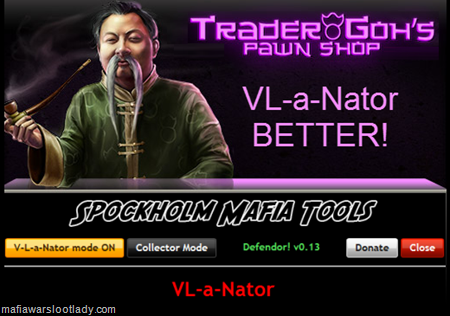
1. Launch the VLA-a-Nator via the Spockholm Toolbar. If it doesn't show up in your search, go to the Configuration Page and click on the "Force reload Spocklets" links.

2. Wait for it to load your inventory.The “VLA-a-Nator” button will remain gray until the loading process is over. While loading, it will say “Loading inventory…” under the log.

If your inventory doesn’t load, it’s a Zynga issue. Try again. If it still doesn’t load, try to load your inventory manually. If you aren’t successful then you won’t be able to use the VLA-a-Nator until your loading issues are resolved.
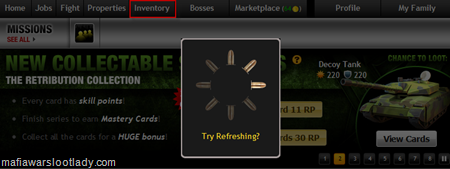
3. Once your inventory loads, the “VLA-a-Nator mode” button will appear unshadowed. Click on it.

4. Now the button will appear yellow, be in the “On” position and you can begin.

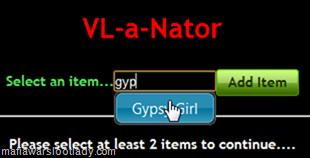
5. In order for the VLA-a-Nator to work, you need to select two items from your inventory. Obviously, you should choose 2 items that no longer help your score and are not giftable. If the items you wish to dump are giftable, it’s much easier and faster to use the Gift-a-Nator to remove them from your inventory. Use the search bar to find your first item, click on it and then click on the “Add Item” button. In the example below, I chose the Gypsy Girl which is outdated fight loot.
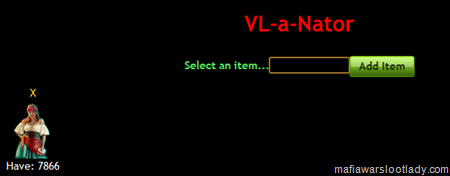
The image and count of the item you select will appear in the far left corner.
6. Now select a second item to remove. I chose the Walrus which is a VIP loot item that I have way too many of.
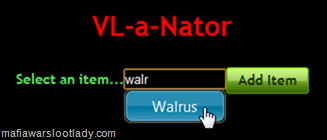
Once both items are selected, they will appear in the corner and you can proceed.
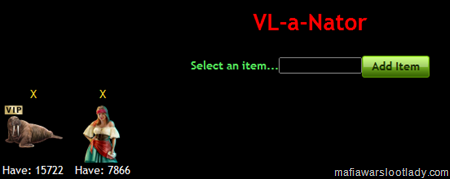
7. Look below the images and you will see a remove box with the lowest number of items from the two you selected as the default.

If you are a collector or don’t have enough time to remove all the items, select how many you want to remove. For the sake of this post, I chose 100.

8. Once you are satisfied with your selection and number of items you want removed, click on the red “Remove now!” button. You will then get a confirmation screen to ensure you really do want to remove the items. Click “OK”.
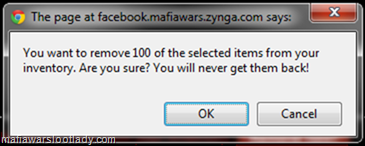
9. Now just wait for the script to do it’s thing. When you consider what needs to be done manually to remove items from the Family Properties, you shouldn’t be surprised that it takes a while. The VLA-a-Nator will rotate the two items you selected and remove one at a time. When it’s finished, the log will say “Done VLA-a-Nating”.

10. If you care about your Family Property health score, turn off the VLA-a-Nator mode and add better items to your property or do it manually. This scripts also includes the functionality of the Defendor!.


1. Launch the VLA-a-Nator via the Spockholm Toolbar. If it doesn't show up in your search, go to the Configuration Page and click on the "Force reload Spocklets" links.
2. Wait for it to load your inventory.The “VLA-a-Nator” button will remain gray until the loading process is over. While loading, it will say “Loading inventory…” under the log.
If your inventory doesn’t load, it’s a Zynga issue. Try again. If it still doesn’t load, try to load your inventory manually. If you aren’t successful then you won’t be able to use the VLA-a-Nator until your loading issues are resolved.
3. Once your inventory loads, the “VLA-a-Nator mode” button will appear unshadowed. Click on it.
4. Now the button will appear yellow, be in the “On” position and you can begin.
5. In order for the VLA-a-Nator to work, you need to select two items from your inventory. Obviously, you should choose 2 items that no longer help your score and are not giftable. If the items you wish to dump are giftable, it’s much easier and faster to use the Gift-a-Nator to remove them from your inventory. Use the search bar to find your first item, click on it and then click on the “Add Item” button. In the example below, I chose the Gypsy Girl which is outdated fight loot.
The image and count of the item you select will appear in the far left corner.
6. Now select a second item to remove. I chose the Walrus which is a VIP loot item that I have way too many of.
Once both items are selected, they will appear in the corner and you can proceed.
7. Look below the images and you will see a remove box with the lowest number of items from the two you selected as the default.
If you are a collector or don’t have enough time to remove all the items, select how many you want to remove. For the sake of this post, I chose 100.
8. Once you are satisfied with your selection and number of items you want removed, click on the red “Remove now!” button. You will then get a confirmation screen to ensure you really do want to remove the items. Click “OK”.
9. Now just wait for the script to do it’s thing. When you consider what needs to be done manually to remove items from the Family Properties, you shouldn’t be surprised that it takes a while. The VLA-a-Nator will rotate the two items you selected and remove one at a time. When it’s finished, the log will say “Done VLA-a-Nating”.
10. If you care about your Family Property health score, turn off the VLA-a-Nator mode and add better items to your property or do it manually. This scripts also includes the functionality of the Defendor!.
No comments:
Post a Comment
Comments are moderated and will not be published until they are reviewed. Please dont use bad language or insult others. For faster feedback on questions, visit our fan page.