
If you like the idea of player updates but don’t like the way Zynga implements them than Player Updates…BETTER! is the script for you. We told you better player updates, compliments of Team Spockholm, were on the way and now they are here Click . To start using them and stop complaining about the ones Zynga provides, follow the instructions below.
1. Type Better into the search area of your Spockholm Toolbar and click on “Playerupdates BETTER”.

If nothing appears, open up the Configuration Page by clicking on the wrench icon located to the far right of the toolbar and click on the “Force reload Spocklets” link.

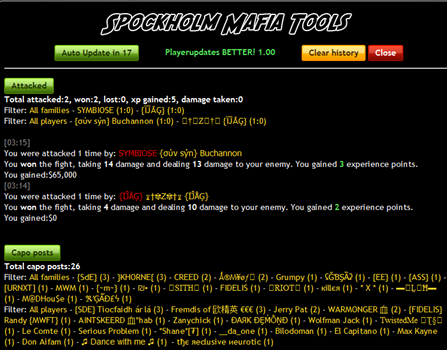
2. The script will launch and you will see your first set of updates.

3. The default has Attacked and Capo posts turned on but you can turn either of these off by clicking on the green buttons.

4. The default mode also auto updates every 30 seconds but you can click on the green countdown button to do it manually if you prefer.


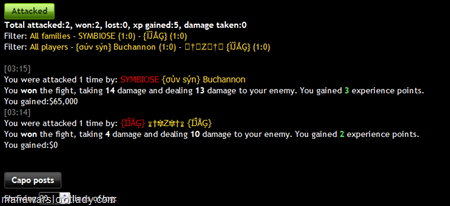
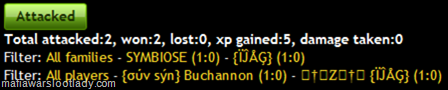
5. You will also notice filter options and you can target specific player and/or families to only appear in your updates. The “Attacked” category will also track the number of times you were attacked, wins, loses, experience gained and damage taken. That’s all there is to this simple helping tool. Leave it running in a separate tab and never miss another update again!
If you get too many updates (something that will never happen with Zynga’s version, just clear your history and start over. That’s all there is to this simple helping tool. Leave it running in a separate tab and never miss another update again!

1. Type Better into the search area of your Spockholm Toolbar and click on “Playerupdates BETTER”.
If nothing appears, open up the Configuration Page by clicking on the wrench icon located to the far right of the toolbar and click on the “Force reload Spocklets” link.
2. The script will launch and you will see your first set of updates.
3. The default has Attacked and Capo posts turned on but you can turn either of these off by clicking on the green buttons.
4. The default mode also auto updates every 30 seconds but you can click on the green countdown button to do it manually if you prefer.
5. You will also notice filter options and you can target specific player and/or families to only appear in your updates. The “Attacked” category will also track the number of times you were attacked, wins, loses, experience gained and damage taken. That’s all there is to this simple helping tool. Leave it running in a separate tab and never miss another update again!
If you get too many updates (something that will never happen with Zynga’s version, just clear your history and start over. That’s all there is to this simple helping tool. Leave it running in a separate tab and never miss another update again!
No comments:
Post a Comment
Comments are moderated and will not be published until they are reviewed. Please dont use bad language or insult others. For faster feedback on questions, visit our fan page.